
Welcome to the second post of my three part series on Chat GPT. We will be discovering how to customize Chat GPT to generate responses that sound more like you.
Your Chat GPT Profile
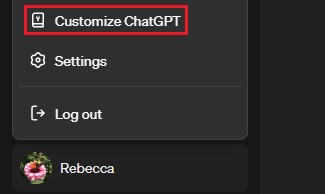
In order to start generating personalized text, click your name or profile photo and select “Customize ChatGPT”. This will bring up a window with two text boxes. Let’s take a look at what to enter here.
What would you like ChatGPT to know about you to provide better responses?
In this field, you will enter demographic information and your personal attributes which affect the way you respond to people. Here are some examples of information you may want to include:
- Hobbies/Interests
- Experience and Profession
- Beliefs/Cultural Preferences
- Objective (Using for education, brainstorming, professional responses)
- Location/Time Zone
- Limitations, such as things not to discuss
- Language Proficiency
- Personality
Here is an example of what someone might write: “I live in Nevada and am currently pursuing my MBA. With 20 years of experience in banking, I bring a deep understanding of finance and business topics to conversations. My interests include running, pilates, video gaming, writing, and horses. I’m passionate about personal finance and business topics. I identify as a female. Health is important to me. I tend to be an optimist but respond neutrally. I am open minded and caring.”
How would you like ChatGPT to respond?
This section concerns tone, style, and what you would like to see in the responses to your prompts. Here are some things to consider adding:
- Level of complexity
- Format (Bullet points, paragraphs), get specific. You could even ask it to avoid punctuation or make every third word “blue”.
- Complexity of responses
- Type of language to use
- Formality
- Words, phrases or language to avoid
- Conciseness or appropriate depth
- Specific instructions
Here is an example of what you could write:
“Write as if you’re having a friendly conversation with the reader.
Use informal language and contractions like “you’re,” “we’ve,” and “let’s.”
Ask rhetorical questions to engage the reader, e.g., “Have you ever wondered?”
Use clear headings and subheadings to organize content.
Employ bullet points or numbered lists to break down information.
Ensure each section flows logically to the next, maintaining a coherent structure.
Provide specific examples and details to illustrate your points.
Use descriptive language to paint a vivid picture for the reader.
Include practical applications and suggestions to demonstrate versatility.
Use inclusive language such as “we,” “us,” and “our.”
Invite readers to reflect and participate by asking open-ended questions.
Encourage readers to think about how the topic could apply to their own lives.“
Tips
- Ask Chat GPT to analyze your writing by typing this prompt: “Analyze the following excerpt from my blog for tone and style: [Insert writing here].” Then ask Chat GPT to turn the analysis into instructions to customize your Chat GPT output. That’s how I generated the example above!
- You don’t need to put a bunch of personal information in your profile. It’s about the idea of you, not your specific data. Protect your privacy.
- You need to start a new chat to see your changes applied.
- Play around with your profile to see the impact on the output.
What instructions have you found success with? What are your best practices? Let me know in the comments and join me for the next post in the series later this month: “Writing Effective Prompts”.





 The Biz Cache
Leave a comment